
Suno - AI Music & Songs Maker
Suno, IncMusic & Audio
4.837.03K Reviews
- Version
- 1.94.0
- Installs
- 10.00M
- Age Rating
- Teen
Screenshots
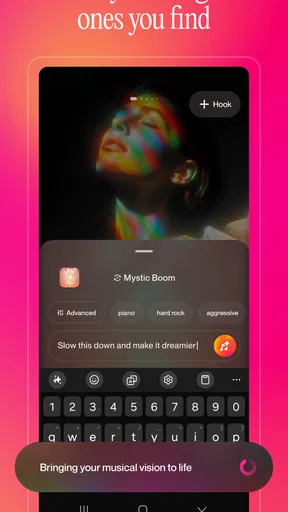
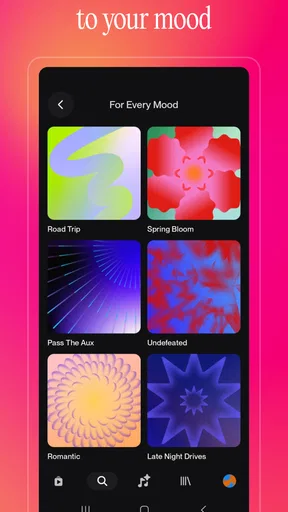
Our Review of Suno - AI Music & Songs Maker
 Analysis by Appyee
I usually reach for a music app with a specific need in mind: something to listen to, a beat to sketch over, or a quick idea I can send to a friend. Suno takes a different route. It turns a written idea into a song, which makes it less like a conventional streaming player and more like a creative starting point. When I want to hear a mood or a scene become music without opening recording software, Suno - AI Music & Songs is an intriguing option.
That difference also shapes who will enjoy it. I don’t need to know music theory to try an idea, but I do need to be comfortable describing what I want and accepting that the first result may not match it exactly. I find the app most useful when I treat each generation as a draft to react to, rather than expecting a finished, precisely controlled composition on demand.
A useful tool for a particular kind of musical curiosity
As a free music and audio app from Suno, Inc, Suno has a broad audience: it can appeal to curious listeners, casual lyric writers, and musicians who want a fast way to test a direction. Its average rating is 4.8 from around 945,000 ratings, and it has passed 10 million installs. Those figures suggest plenty of people are interested in the idea, though they don’t tell me whether a particular song will suit my taste. I’d judge that by trying a few prompts that are genuinely different, not by making the same request repeatedly.
The age rating is Teen, so I’d still use ordinary judgment about what I ask it to create and who might hear the result. The app is free to install, with in-app purchases ranging from $4.00 to $289.99 per item. That wide span is worth noticing before committing to paid options: I’d begin with the free experience, see whether the workflow fits, and check the purchase details in the app before spending. It runs on Android 8.0 or later, and version 1.41.0 is the current release.
For comparison, a streaming service is the better choice when I want familiar songs, reliable playlists, or an artist’s exact recording. A conventional recording or beat-making app is stronger when I want hands-on control over every part of a track. Suno sits between those approaches: I give it a creative brief, then judge and refine what comes back. That makes it fun for exploration, but it is not a replacement for a music library or a full production setup.
From a quick idea to something worth sharing
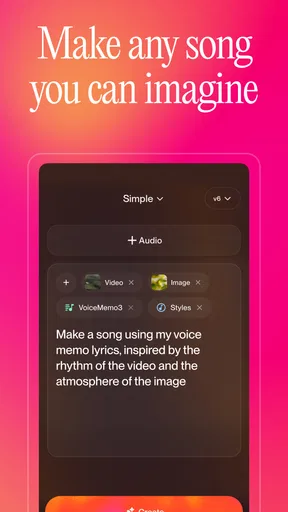
Right off the bat, downloading Suno - AI Music & Songs is a breeze. The app's interface is sleek and intuitive, which means you’ll be creating tunes without breaking a sweat. You know that feeling when an app feels like it’s reading your mind? Yep, this one does that.
Turning a vague mood into a workable prompt
The most useful first step is getting specific about the feeling I’m after. “Make something upbeat” leaves a lot open; describing the occasion, energy, and musical direction gives me a more meaningful result to evaluate. I avoid stuffing a prompt with contradictory instructions, because asking for several moods or styles at once can make it harder to tell what I actually want. A short, clear brief is easier to revise than a paragraph that tries to control every detail.
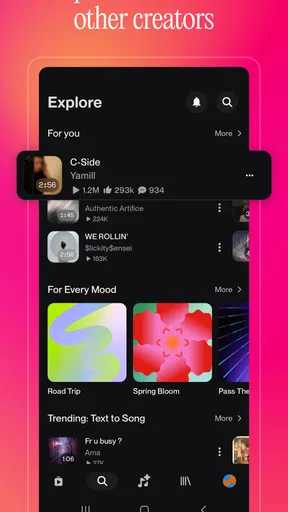
Once you dive into the app, you’ll be greeted with a bunch of options to explore. Whether you’re into jazz, hip-hop, or something more classical, Suno’s got you covered. The AI does a pretty nifty job at generating music that doesn’t sound robotic or forced. It’s almost like magic watching it whip together melodies that can easily get stuck in your head.
I’d use that first result as a listening test, not a final verdict. Does the vocal delivery fit the mood? Is the chorus memorable in the right way, or does it pull attention away from the idea? Those questions help me decide whether to adjust the wording, simplify the request, or abandon that direction. If I’m working on a song for a particular person, I’d also listen for whether the lyrics feel personal rather than merely polished; a custom prompt still needs my own details to feel like a real message.
Revising without losing the part that works
One practical approach is to change one thing at a time. If the melody is appealing but the mood is wrong, I focus the next attempt on mood rather than rewriting the whole brief. If the lyrics are the weak point, I work on those separately instead of changing the musical direction too. This isn’t a guarantee that the next version will improve, but it makes the comparison clearer and helps me learn which parts of my description seem to matter.
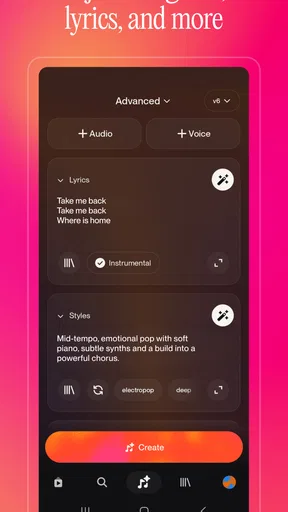
One of the standout features is the level of customization available. You can tweak lyrics, adjust tempos, or even change instruments. It's like having a mini recording studio right in your pocket. The flexibility means you can experiment to your heart's content, which is perfect if you're feeling particularly creative.
I’d be careful not to confuse customization with the fine-grained control of a traditional studio. Suno makes experimentation approachable, but someone who needs to arrange every note, edit a performance precisely, or maintain a particular sound across a finished project may be happier in dedicated production software. For a casual sketch, though, the ability to shape lyrics and musical choices can help turn a broad idea into something more recognizably yours.
Where a generated song fits into an ordinary day
Imagine I’m making a small birthday video after work and want a cheerful musical idea that feels more personal than a stock track. I can describe the celebratory mood and the kind of sound I have in mind, listen to the result, then decide whether its lyrics and energy fit the clips. If it’s close, I can refine the idea; if it isn’t, I can use a different direction instead of forcing a bad match. That is a realistic strength: quickly exploring possibilities when I don’t have the time or equipment to compose from scratch.
There’s a useful trade-off here. A song made for a specific occasion can feel more tailored than choosing an existing track, but the generated result may still need human judgment. I’d check the wording carefully before sharing it, especially if it mentions a person or event, and I wouldn’t assume that a first draft says exactly what I meant. The app can help me get to a creative starting point; deciding whether that starting point is appropriate remains my job.
And if you're someone who loves sharing their creations, Suno makes it super easy to export and share your tracks. Talk about a win-win!
Moving a track from the app to another person
Sharing is a handoff, not the end of the creative process. Before I send a song to a friend or place it in a video, I’d listen all the way through and check that the lyrics, tone, and ending make sense in context. A track that works as a playful experiment may not suit a public post or a professional project. If the next step involves editing, mixing with other audio, or fitting music to a specific length, I’d confirm that the available export and the receiving tool meet that need rather than assuming a simple share will provide studio-ready control.
That distinction matters when choosing between Suno and familiar alternatives. A streaming track is usually the straightforward pick for background listening, while a recording app gives me direct control if I already have a melody or performance to capture. Suno is most compelling when I have an idea but not the means—or the desire—to build the entire arrangement myself. It can also be a useful way to create a rough reference for a collaborator, provided everyone understands it is a generated sketch and not necessarily a finished production.
What the AI can do—and what I still need to decide
Let’s talk about the AI because it’s the real star here. It’s surprising how well it understands musical nuances. I found it fascinating how it adapts to different styles and moods. It's not just about throwing random notes together; there’s a genuine sense of musicality here. If you’re someone who’s been skeptical about AI’s role in music, this app might just change your mind.
Still, a convincing performance is not the same as precise authorship or control. I’d listen for details that can be easy to overlook on a quick preview: whether a phrase sounds awkward, whether the emotional tone drifts, and whether the track’s most prominent moment actually supports the purpose I had in mind. If I need a dependable, repeatable arrangement for a serious release or a carefully synchronized edit, I’d want a workflow that gives me more direct control and room to inspect the parts.
The AI also learns from your preferences. The more you use it, the better it gets at predicting what you might like. It's like having a personal assistant who’s also an aspiring musician.
For the best results, I’d keep a note of the prompts that lead to useful outcomes. That gives me a practical starting point next time and makes it easier to identify which descriptions consistently capture the sound I like. I’d still leave room to change the brief: repeating one successful formula can produce familiar results when what I need is a fresh idea. The app is more rewarding when I use previous attempts as clues, not as a rigid recipe.
When another tool is the better call
I wouldn’t choose Suno if my main goal were to browse a huge catalog of released songs, build a dependable listening queue, or hear a specific performer’s recording. I’d also look elsewhere if I needed detailed manual editing or wanted to record and arrange a performance note by note. In those situations, streaming and production apps solve the problem more directly.
I’d also be cautious about relying on a generated track when accuracy matters more than inspiration. A personal message, a branded piece, or music intended for a tightly timed edit deserves a careful listen and, where needed, further editing in a tool built for that job. Suno is a better fit when speed and idea generation matter more than exact control. That boundary doesn’t make it less useful; it helps me use it for what it does well instead of expecting it to replace every part of making music.
Final Thoughts
In a world where creativity can sometimes feel stifled, Suno - AI Music & Songs is a breath of fresh air. Whether you’re a professional musician or just someone looking to have a bit of fun, this app is worth checking out. It’s a blend of technology and creativity that feels both groundbreaking and accessible.
So, if you’re ready to unleash your inner composer, give Suno a try. It might just become your go-to app for all things music.
Privacy and Permissions
See what permissions an app requests and how it handles your data.
- Photos/Media/Files
- read the contents of your USB storage, modify or delete the contents of your USB storage
- Storage
- read the contents of your USB storage, modify or delete the contents of your USB storage
- Camera
- take pictures and videos
- Microphone
- record audio
- Other
- view network connections, change network connectivity, full network access, change your audio settings, run at startup, control vibration, prevent device from sleeping, Google Play license check
Verdict
Strengths of Suno - AI Music & Songs Maker
- Intuitive interface for easy navigation.
- Wide variety of music genres available.
- High-quality audio streaming.
- Regular updates with new features.
- Offline mode for data saving.
Limitations of Suno - AI Music & Songs Maker
- Requires a stable internet connection.
- Ads can be intrusive for free users.
- Limited skips on free version.
- Subscription cost might be high for some.
- Not all songs available globally.
Similar Picks in This Category
View All
YouTube Music
Google LLC4.4

Samsung Music
Samsung Electronics Co., Ltd.3.8

Spotify: Music and Podcasts
Spotify AB4.3

JioSaavn - Music & Podcasts
Saavn Media Limited4.3

Lark Player:Music Player & MP3
Lark Player Studio - Music, MP3 & Video Player4.6

StarMaker: Sing Karaoke Songs
SKYWORK AI PTE. LTD.4.3
Frequently Asked Questions
What is Suno - AI Music & Songs, and how does it work?
Suno - AI Music & Songs is an innovative app that leverages artificial intelligence to create personalized music tracks. Users can input their preferences, and the AI generates unique songs tailored to their tastes. It's a fun and creative tool for music enthusiasts looking to explore new sounds and styles.
Is Suno - AI Music & Songs free to use, or does it require a subscription?
Suno offers a free version with basic features, but to access premium content and advanced functionalities, a subscription is required. The subscription model provides additional benefits such as higher-quality audio tracks and an expanded library of musical styles and genres.
What devices and operating systems are compatible with Suno - AI Music & Songs?
Suno - AI Music & Songs is compatible with both Android and iOS devices. It requires Android version 5.0 and up or iOS version 11.0 or later. This ensures a smooth user experience across most smartphones and tablets, allowing users to enjoy the app’s features on their preferred device.
Can I share the music I create on Suno with others?
Yes, Suno allows users to share their created music tracks directly from the app. You can easily share your songs through social media platforms, messaging apps, or via a direct link. This makes it simple to showcase your creativity and get feedback from friends and followers.
Does Suno - AI Music & Songs require an internet connection to function?
An internet connection is required to use Suno - AI Music & Songs, as the app depends on cloud-based AI processing to generate music. However, once a track is created, users can download it for offline listening, allowing them to enjoy their personalized music anywhere, anytime.
